
How to Translate Word Documents and Preserve Layout, Images, and Professional Terminology
Learn how to translate Word documents while preserving heading hierarchies, OCR images, and custom glossaries. DeckFlow supports files up to 500MB, making it the best Word translator in 2026 for legal and academic professionals.
In the globalized office landscape of 2026, handling a professional Word document (.docx) is no simple task. Many professionals encounter these frustrating challenges during the translation process:
- Layout and Hierarchy Collapse: After translation, not only do images shift, but the core heading hierarchy (H1, H2, H3) is often lost, rendering navigation panes and tables of contents useless.
- Multimedia Blind Spots: Text within images and SmartArt diagrams is frequently overlooked by translators, resulting in significant language gaps that disrupt information flow and damage the document's professional feel.
- Terminology Deviation: Generic translation engines struggle with highly specialized vocabulary in legal or medical fields. A lack of contextual understanding often leads to semantic inaccuracies.
- File Size Restrictions: When a file contains numerous high-resolution images or spans hundreds of pages, mainstream tools often fail due to 10MB–20MB upload limits.
The true essence of translating Word documents lies in the unity of "professionalism" and "fidelity".
DeckFlow Officially Supports Word Translation, Defining Professional-Grade Restoration
We are excited to announce that DeckFlow now officially supports Word (.docx) translation. We are not just focusing on converting text; we are dedicated to solving the "persistent ailments" of professional document processing through underlying technology.
DeckFlow’s Word translation solution features:
- Structural Restoration: Preserve styles, fonts, heading hierarchies, and headers/footers to ensure the table of contents and logical structure remain intact.
- Full Element Coverage: Synchronously convert text, tables, SmartArt, and even text within images.
- Precise Terminology Control: Use custom glossaries to ensure accurate translation of specialized terms in legal, medical, and other vertical fields.
- Native-Feel Experience: The resulting translation feels as if it were written directly in the target language, without any of the awkwardness of "translated" text.
Why DeckFlow is the Premier Choice for Professional Word Documents?
While many tools like Google Translate or DeepL are available, DeckFlow demonstrates significant competitive advantages when facing complex business documents:
Core Capability Comparison Table
| Feature | DeepL | DeckFlow | |
| Max File Size | 10MB | 5-20MB | 30-500MB |
| Glossary Support | ❌ Not Supported | ✅ Supported | ✅ Supported |
| In-Image Text | ❌ Unable | ❌ Unable | ✅ AI OCR & Translation |
| SmartArt | ✅ Supported | ❌ Not Supported | ✅ Deep Native Adaptation |
| WordArt | ❌ Not Supported | ✅ Supported | ✅ Supported |
Our Key Advantages:
- Support for up to 500MB: Whether it is an academic paper with numerous high-resolution data charts or a massive legal manual/dossier with extensive text, DeckFlow’s 500MB limit ensures your workflow is never interrupted by "file too large" errors.
- Exclusive Glossaries and Contextual Understanding: Addressing the pain point of inaccurate professional terms, DeckFlow allows users to upload their own Glossary, working with contextual semantic understanding to eliminate translation bias.
- Eliminating Multimedia Blind Spots: Traditional tools often ignore text in images, but DeckFlow integrates advanced OCR technology to automatically translate image content, ensuring no part of the document is left out.
How DeckFlow Achieves "Native-Feel" Translation?
As a professional online file translation tool, DeckFlow seamlessly handles various formats including PPT, PDF, Keynote, and Word. Its effectiveness as an online docx translator stems from its ability to parse and protect the underlying structure of the document.
Ordinary translators simply extract text, which often destroys the layout and results in lost heading hierarchies. DeckFlow protects internal style tags, ensuring the translated text maintains its original hierarchical attributes (such as H1, H2). Simultaneously, our system dynamically adjusts the size of graphics and text containers based on the character length of the target language, effectively avoiding text overflow or overlapping tables.
How to Use DeckFlow to Process Word Documents
We have simplified the steps so you can operate as efficiently as any standard cloud software:
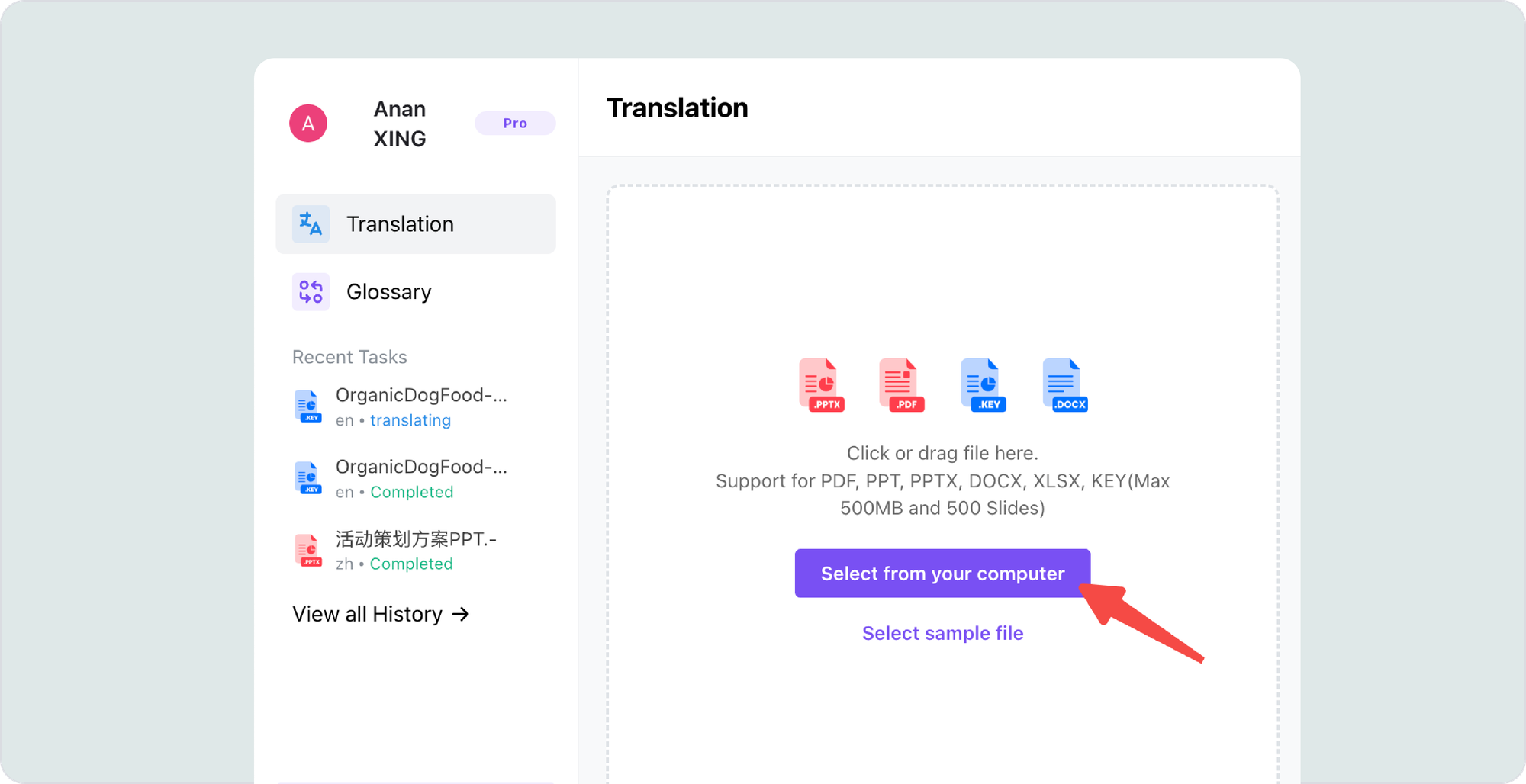
1.Upload File: Log in to DeckFlow and drag in your .docx document (up to 500MB).
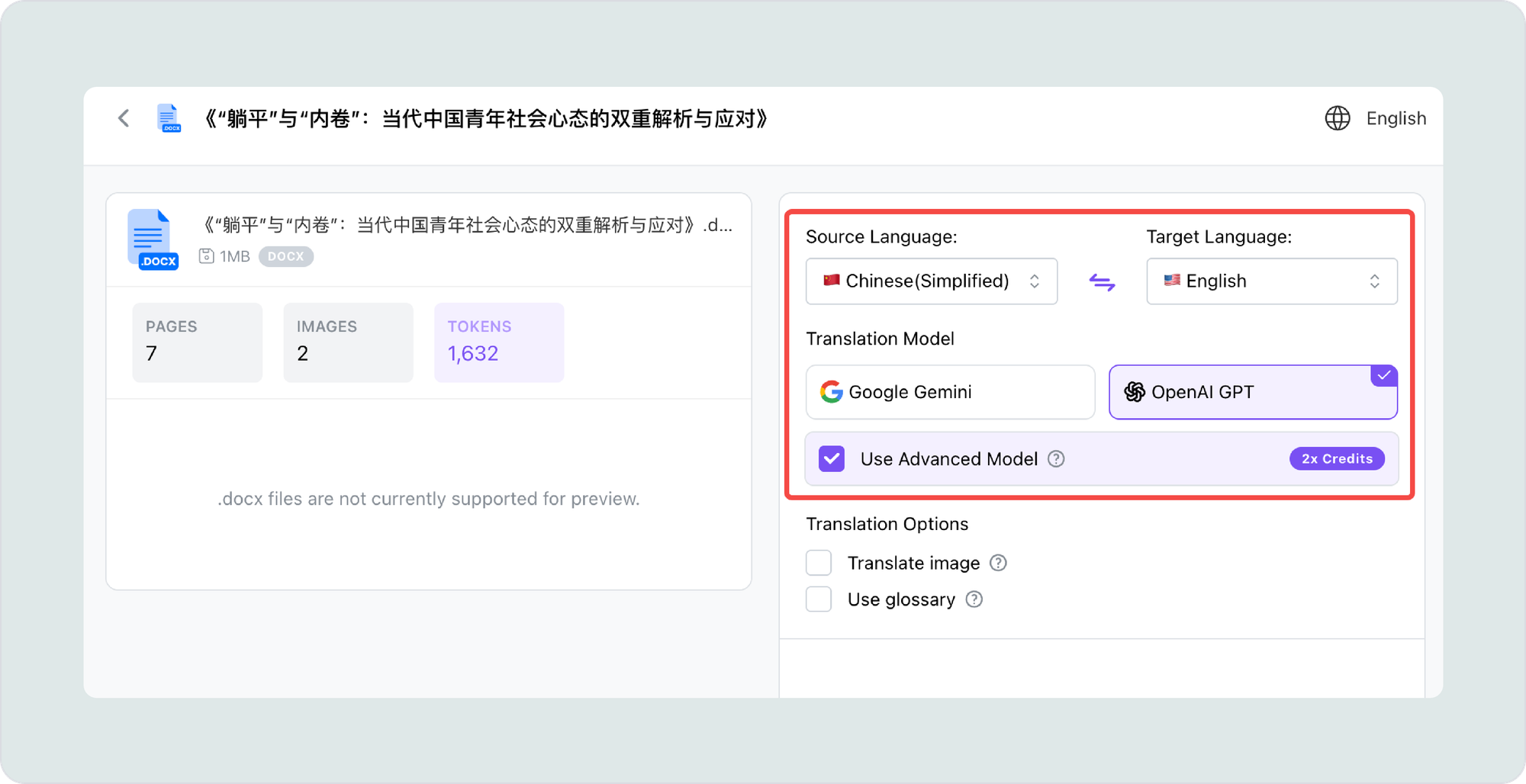
2.Set Parameters: Select your target language (e.g., Chinese to English). If you have high requirements for linguistic precision, we recommend checking the "Use Advanced Model" option to invoke deeper AI logic for complex contextual semantics.
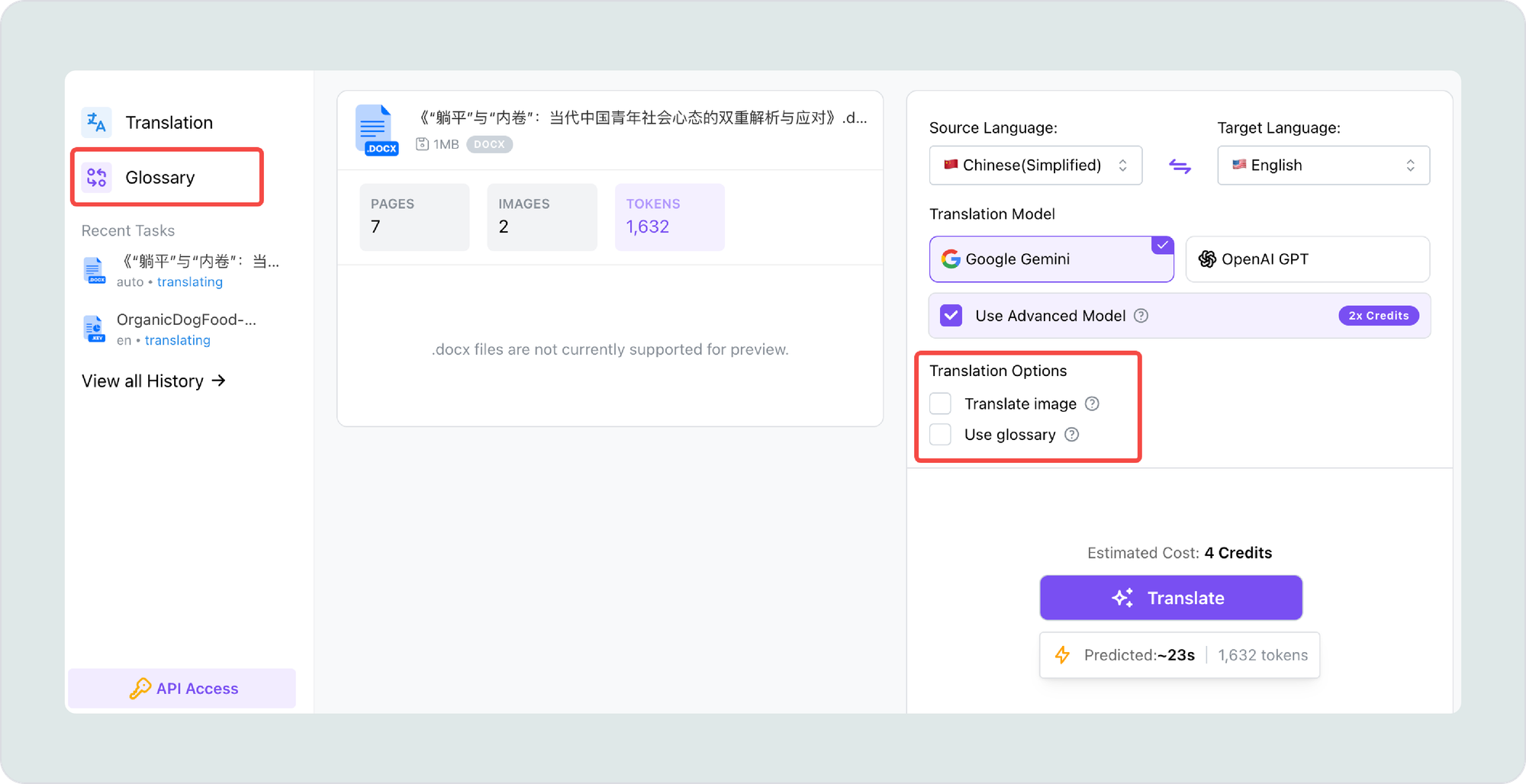
3.Configure Advanced Tools:
- Image Translation: Enable the "Translate image" toggle. The system will use OCR to automatically recognize and translate text within images, charts, and flowcharts.
- Glossary Management: Check "Use glossary" to fix specific terms. You can pre-load your professional glossary in the "Glossary" section on the left.
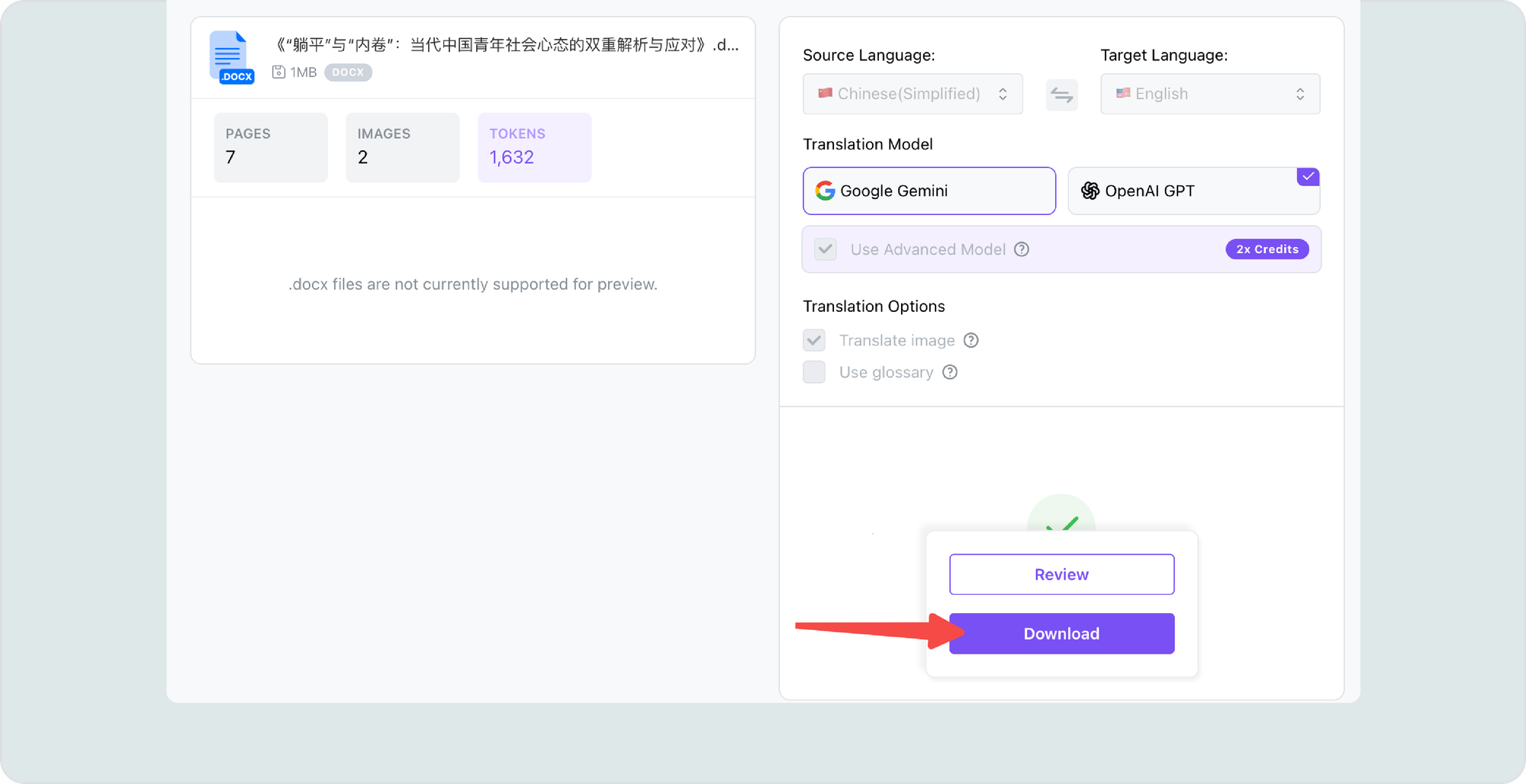
4.Translate and Download: Click the "Translate" button. The system will begin structural analysis and translation. After a short wait, you can download the professional translation with the original layout, heading hierarchy, and all multimedia styles preserved.
Pre-Flight Checklist for Perfect Results
To ensure the best results, please check the following before uploading:
- Document Permissions: Ensure your Word document is not set to "Read Only" or password-protected so the AI can parse the style information.
- Image Clarity: While we support OCR, extremely blurry images may affect the accuracy of text recognition.
- Complex Equation Plugins: We support most Word components, but for highly complex third-party math plugins, a manual spot-check after translation is recommended.
- Font Recommendations: Use common universal fonts. If your document contains extremely rare fonts, we suggest converting them to standard styles for the best compatibility.
In 2026, professional document translation should no longer be a bottleneck in your workflow. Whether you are handling a rigorous academic paper or a complex legal manual, DeckFlow offers more than just language conversion—it provides deep maintenance of your document's logic and professional image.By supporting massive 500MB files, custom glossaries, and comprehensive image OCR translation, we aim to free you from the burden of manual formatting corrections.
Moreover, if you also have presentation translation needs, DeckFlow has recently launched our newest Keynote translation feature, you can explore our [Keynote translation guide] here to learn more.
Experience DeckFlow today, and let this professional Word translation tool become your right hand in handling complex documents, ensuring every manuscript maintains its original rigor and elegance in global communication. Visit DeckFlow now and start translating your Word files today!